
The most common hesitation I hear from business owners considering a move to Linux isn’t about the software—it’s about the hardware. Will the WiFi work? Will my peripherals connect? Will the system be stable?
As an infrastructure engineer who has managed Linux environments for two decades, I can tell you: Linux hardware support in 2026 is not just “better”—in many cases, it is more robust than modern Windows. Here is the engineering reality of Linux compatibility.
The Big Picture: Why Linux Breathes Life into “Obsolete” Silicon
Linux is the most versatile kernel in existence. It powers everything from the world’s fastest supercomputers and Houston-based web servers to the industrial controllers I’ve managed in steel mills.
The irony of the current “Windows 11 Hardware Wall” is that the very machines Microsoft is sending to the landfill are in the Linux Sweet Spot. A 2012-era laptop with an Intel Core i5 and an SSD isn’t a “legacy” challenge for Linux; it’s a high-performance workstation.
Minimum Requirements by Use Case
Unlike Windows, Linux doesn’t have a “one size fits all” hardware requirement. We choose the environment based on the available resources.
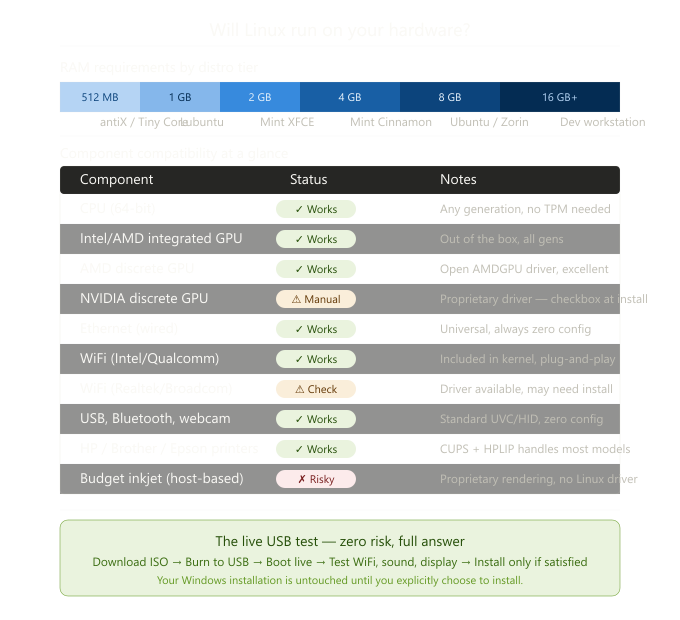
- Mainstream Business (Linux Mint, Ubuntu): 64-bit CPU (post-2007), 4GB RAM, 20GB Disk. This provides a full modern desktop experience comparable to Windows 11 but with significantly lower background overhead.
- Lightweight Efficiency (Lubuntu, XFCE): 2GB RAM. Ideal for dedicated workstations or “kiosk” style business machines.
- Legacy Recovery (antiX, Debian-stable): 512MB to 1GB RAM. These distributions can resurrect hardware that hasn’t been useful in a decade, running entirely in RAM for near-instant responsiveness.
The Infrastructure Breakdown: What to Expect
CPUs: The End of Generation-Gating
Linux imposes no arbitrary CPU “generations.” If the chip is 64-bit, it runs. We don’t care about TPM 2.0 or Pluton security processors. From an engineering perspective, an Intel Core 2 Duo or a first-gen Ryzen is perfectly capable of handling 2026 web standards when stripped of Windows’ telemetry and background bloat.
RAM: The Real Performance Ceiling
In my experience, RAM is the only metric that truly dictates your “quality of life” on Linux.
- 8GB+: A “power user” environment. Smooth multitasking across browsers and virtual machines.
- 4GB: The standard business baseline. Efficient for office suites and web-based CRM tools.
- Under 4GB: We pivot to “Thin Client” configurations, prioritizing browser-based workflows.
WiFi & Networking: The “Firmware” Factor
WiFi is the only area where “Honest Engineering” is required. While 95% of chips work out of the box, some budget Realtek or older Broadcom chipsets require proprietary firmware blobs.
- The Engineer’s Rule: Always test with a “Live USB” first. If the WiFi connects in the live environment, the driver is already in the kernel.
Printers & Peripherals
The CUPS (Common Unix Printing System) has matured significantly. Most modern network printers (HP, Brother, Epson) are detected instantly via mDNShttps://www.google.com/search?q=/Bonjour.
- Pro Tip: For business environments, Brother Laser Printers remain the gold standard for Linux compatibility due to their robust driver support.
Why Hardware Compatibility Matters to Your Website
When I build Managed WordPress Hosting on my Houston infrastructure, I apply the same hardware scrutiny I use for desktops. We don’t use “commodity” shared hardware. We use specific, hardened Linux stacks that ensure the hardware and software are in perfect sync.
If you are tired of hardware manufacturers telling you when your computer is “finished,” you are ready for the Linux philosophy.
The “Test-First” Principle
Every major Linux distribution allows you to boot from a USB drive without touching your hard drive. This is the definitive compatibility test.
- Boot from USB.
- Check your “Big Three”: WiFi, Sound, and Display Resolution.
- Verify Peripheral Support: Plug in your printer or scanner.
If it works here, it works forever.
Next Steps in the Transition:
- Ready to switch? The Best Linux Distributions for Beginners in 2026
- Need Professional Infrastructure? Explore–my Engineer-Managed Hosting Plans
Leave a Reply